What is Distributed Rendering (DR) Spawner?
Tutorial: How to set up the DR Spawner by Edgar Navas
Firs of all, you have to connect yours PCs in a LAN (Local Area Network) and know each IP address. By default, Windows OS come with DHCP activated, which is the hub that assigns the IP addresses of each pc.
In my case, for practical reason I made my LAN with static IPs. The default IP address is 192.168.xx.xx. I use another because I manually assign IP address to a specific PC. I use 172.16.25.xx
Ok, going back to IPs issue, to know what is the IP address of each PC, in the windows star menu, choose run and then CMD. A window like this should appear.

Inside the DOS windows, you have to type ipconfig and then key enter o intro and the screen will look like this.


In V-ray Options->System check box ON and then click to the button with 3 points


Enter all hosts or servers, click on the button resolve servers and check the IP addresses that we have entered.


Distributed Rendering Spawner Off


Distributed Rendering is the capability to render a single image across multiple computers. This has the possibility of utilizing multiple computers which can greatly increase rendering speed. VRay can use up to ten computers with just one license.
An expert in the field of Distributed rendering is Edgar "rodrigonotor" Navas. I asked him if I could share in this blog his tutorial and he gave me a permission to post this excellent tutorial here.
Firs of all, you have to connect yours PCs in a LAN (Local Area Network) and know each IP address. By default, Windows OS come with DHCP activated, which is the hub that assigns the IP addresses of each pc.
In my case, for practical reason I made my LAN with static IPs. The default IP address is 192.168.xx.xx. I use another because I manually assign IP address to a specific PC. I use 172.16.25.xx
Ok, going back to IPs issue, to know what is the IP address of each PC, in the windows star menu, choose run and then CMD. A window like this should appear.
Inside the DOS windows, you have to type ipconfig and then key enter o intro and the screen will look like this.
In my case, my IP address is 172.16.25.7 this can be done in each PC that you want to connect whit DR Spawner.
Second an important thing to know, probably you have installed V-ray without Distributed Rendering Spawner, again run the installer an choose only the DR Spawner option.
Second an important thing to know, probably you have installed V-ray without Distributed Rendering Spawner, again run the installer an choose only the DR Spawner option.
Once the DR Spawner is installed in each PC you have to run, it. It can be accessed using Windows start->Programs->V-ray for Sketchup->Distributed Rendering Spawner. When you run the DR Spawner a window like this should appear.
Don`t close that window.
The third important thing to know is the Window Firewall. You need to set up permissions to the Windows Firewall.
The third important thing to know is the Window Firewall. You need to set up permissions to the Windows Firewall.
Ok, almost done, to make sure that the Master is connecting to other PCs run CMD again and type (in my LAN is) ping 172.16.25.xx -t where xx is the number or numbers assign to each PCs
Now the LAN is ready to make a Distributed render
In V-ray Options->System check box ON and then click to the button with 3 points
Here is for config the hosts (slaves) add server write the IP address and OK
Enter all hosts or servers, click on the button resolve servers and check the IP addresses that we have entered.
Check the box for each server
And done, Distributed Rendering Spawner it's configured.
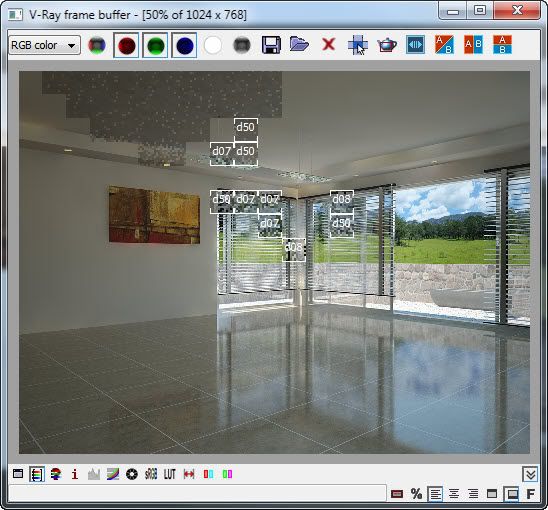
Distributed Rendering Spawner Off
Distributed Rendering Spawner On. Starting
Distributed Rendering Spawner On. Processing.
Distributed Rendering Spawner On. Almost finished
Best Regards (Saludos),
Edgar Navas